
How Conference Attendees Get Their Photos on LinkedIn, Fast

TIME&SPACE · Event Technology
Attendees want their conference photos on LinkedIn while the event is still fresh. How face matching and a built-in share panel get them there, step by step.
How Conference Attendees Get Their Photos on LinkedIn, Fast
In short: At a conference, the photo an attendee wants most is the one they can post on LinkedIn today. The usual route is slow: a gallery link days later, a scroll through hundreds of images, a download, then a post. With TIME&SPACE the attendee scans a code, takes one selfie, sees the photos they appear in and posts them to LinkedIn from the same screen. This is how that works, what the organiser controls, and what still depends on you.
Conference photos are a kind of currency. An attendee who posts a photo from a keynote or a coffee-break conversation tells their network where they were, and it tags your event in front of people who were not there. The window for that is short. A photo posted the same day gets seen; a gallery link that lands in an inbox a week later mostly does not.
The slow way
At most conferences the professional photographs go to the organiser first. A few days later, a gallery link goes out to everyone. An attendee who wants their own photo has to open it, scroll through hundreds of images they are not in, find the few that matter, download them, and only then think about posting. Most people stop before the last step.
The faster way, step by step
- The photographer uploads during the event. Photos do not have to wait for the final day. How instant photo delivery works at events covers the upload side.
- The attendee scans a code. It can be on a badge, a slide, a sign at registration or a coffee station. They tick a consent box before any face scan, take one selfie, and need no app and no account.
- They see the photos they appear in. Only those, found by matching the selfie to the photographer's pictures. Whether there are photos depends on whether the photographer captured them.
- They tick the photos and post. A bar appears at the bottom of the screen with the next step in one tap.
- They choose where it goes. LinkedIn is first. After connecting LinkedIn once, the attendee posts from the panel itself, one photo or between 2 and 20. WhatsApp opens with the photos and text ready. Instagram and TikTok are on the phone, one photo at a time, with the caption copied for the attendee.
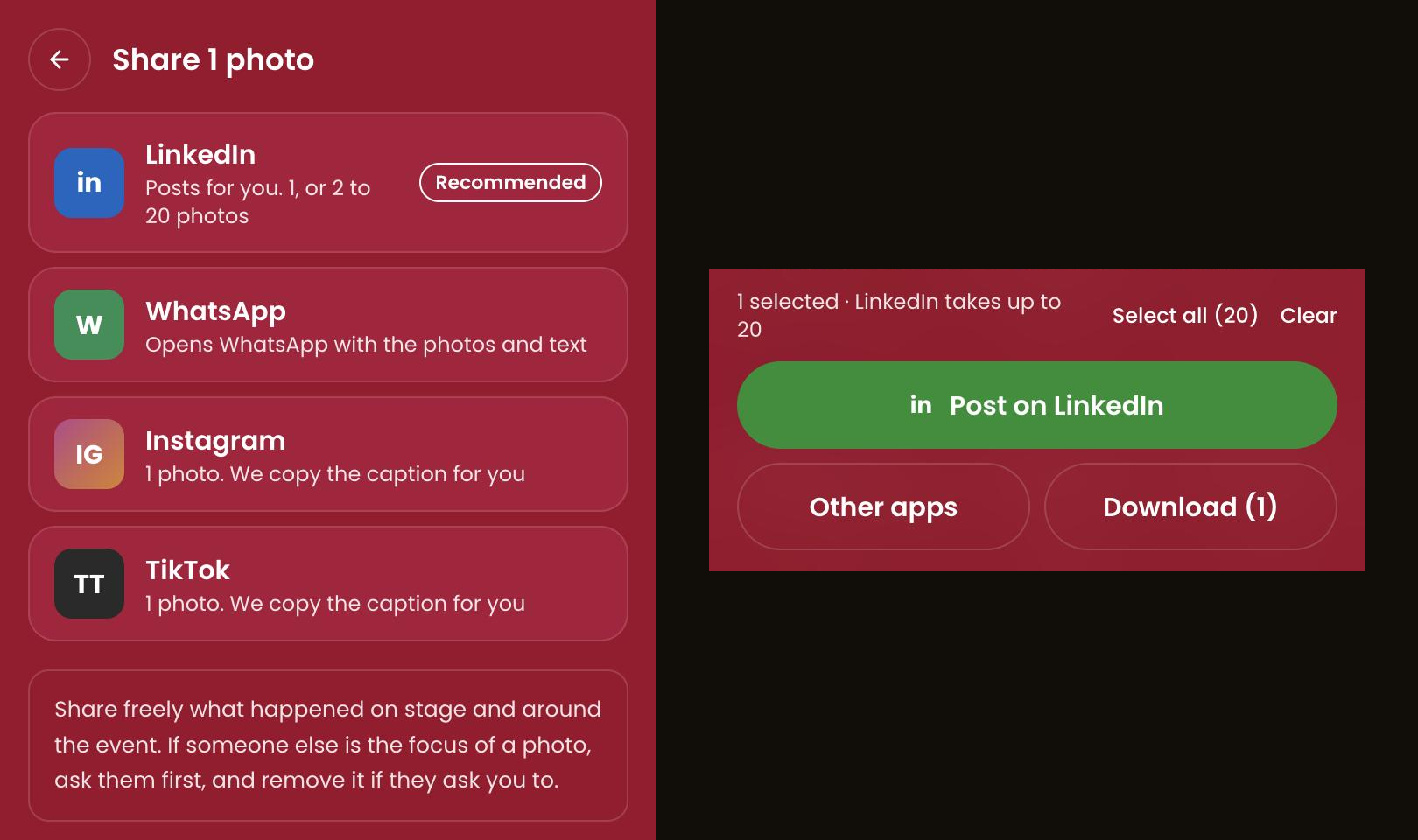
Left: the share panel. Right: the selection bar that opens it, with one photo ticked. Both are screenshots from one of our own test events, with no guests in view. LinkedIn takes one photo or up to 20 in a single post, and the panel reminds attendees to ask someone first if they are the focus of a photo, and to remove it if asked.
What goes out with the post
The post carries a link back to your event, so everyone who sees it can find the rest of the gallery, and the photographer's credit stays with the photo. The shared image has the same watermark settings as a normal download, so whatever you set for downloads applies to shares too.
What the organiser controls
- Which photos can be shared. Attendees can share the photos they appear in. If you have switched the public gallery on, they can also share public photos from it. Private photos are never shareable.
- Switching it off. Sharing is on every plan, and you can turn it off for an event in the Guest experience settings.
- Seeing what happens. The event's Insights page counts shares by app and the clicks coming back, so you can see whether the code on the badge is working. A LinkedIn post is confirmed when it is published; for WhatsApp, Instagram and TikTok we can only record that the attendee chose the app.
What still depends on you
- Upload speed. A share is only as fast as the photographer. Ask for uploads in batches through the day rather than at the end.
- A visible code. Where you place the QR code decides how many attendees reach their photos at all.
- The photographer capturing people. Matching finds people who were photographed; it cannot create photos. For a speaker, a panel or a networking session, brief your photographer to capture people, not just stages. Delivering professional photos to every conference attendee covers the whole flow.
Privacy, in one place
Face matching works on explicit consent: the attendee ticks an unticked box before the selfie. The selfie image is deleted after 30 days, processing is in the EU, and there is a data processing agreement available for organisers. What happens to your selfie after you scan it explains each step.
Frequently Asked Questions
Q: How can conference attendees get their event photos quickly to post on LinkedIn?
With a QR code that opens a gallery, a selfie to find their photos, and a share panel that posts to LinkedIn from the same screen. The speed depends on how soon the photographer uploads.
Q: Do attendees need to install an app?
No. The code opens a page in the phone's browser. They connect LinkedIn once the first time they post.
Q: Can attendees post photos of other people?
They can share photos they appear in, and public gallery photos if the organiser has the gallery on. The panel reminds them to ask first if someone else is the focus of a photo, and to remove it if that person asks.
Q: Can organisers switch sharing off?
Yes, per event, in the Guest experience settings.
Q: Does it replace the event photographer?
No. It delivers the photographer's pictures to each attendee. Without a photographer capturing people, there is nothing to match.

Founder, TIME&SPACE